
Files Connect3.1 - App Store
You'll be able to see results in few seconds.
Publisher Description
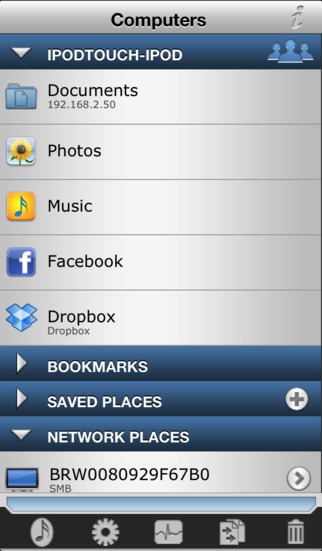
Files Connect is the most powerful file sharing tool in the app store.
"iOS App of the Week - July 14 2011" - The Register
+ Compatible with MAC OSX 10.7 Lion
+ Automatic Discovery of computers and NAS on your work or home network.
+ Morph your iPhone/iPad into a drag-n-drop network drive easily accessible from your computer.
+ Vast Cloud Storage services like Dropbox, MobileMe iDisk, Google Docs/Picasa, Facebook photos, FTP, SFTP, WebDAV plus more.
+ File Management streamlined and simplified with a user interface geared for file sharing.
+ Open downloaded files in your favorite apps by using the Open In.. feature.
+ View and Transfer large folders and files simultaneously.
+ Record voice memos, audio clips, music, and videos and then WiFi transfer to your computer, the cloud, or share by email.
Next Generation WiFi Network Drive:
- Shows up automatically in Finder (MAC OSX) and My Network Places (Windows) with zero configuration and no special software.
- Transfer files between Files Connect and your computer
- Share files with other Files Connect users in your local network.
- View and transfer photos and videos stored on the iPhone/iPad.
- Uses the SMB protocol that gives you powerful file sharing features.
Unrivaled Connectivity:
- Access files on your Windows, MAC OSX or Linux computers.
- Access files on a NAS device or a media server
- SMB, AFP, FTP, SFTP, WEBDAV protocols
- Transfer files via iTunes (USB)
- Save email attachments
- iPod music and Photos
Documents, Photos, Videos, Voice and Music:
- Support for all standard iOS video, audio, image, and document formats.
- iWorks files (Pages, Numbers, Keynote)
- Microsoft Office (Word, Excel, PowerPoint)
- HTML web pages
- PDF Documents like your favorite iBooks!
- RTF (Rich Text Format)
- Open files in other applications installed on your iPad.
- Image Editor - Gray Scale, HSB, Blur, Border, Crop, rotate, border
File Management:
- Copy, rename, delete and move files between computers.
- Zip and unzip files and folders.
- Extract RAR files (RAR, CBR).
- Email files as attachments.
- Print Files using Apple Airprint and CUPS (MAC OSX shared) printers.
Flexibility:
- Connect to more than one server at a time.
- Simultaneously transfer multiple files and folders.
- Stream videos and music.
- Continue to stream music in the background
- Have multiple open files for viewing at the same time
Powerful Extras:
- Protect the application from unauthorized use with an in-app passcode
- Wake up your computer remotely (Wake on LAN)
- SSH Public Key authentication (for SFTP)
- Bookmark frequently accessed files and folders
- Edit text files and images
- Want all of this PLUS more like remote desktop capabilities?
Check out our premier "Cloud Connect Pro" app in the business section
Requires iOS 5.1 or later. Compatible with iPhone, iPad, and iPod touch.
About Files Connect
The company that develops Files Connect is Antecea Inc.. The latest version released by its developer is 3.1.
To install Files Connect on your iOS device, just click the green Continue To App button above to start the installation process. The app is listed on our website since 2011-03-16 and was downloaded 0 times. We have already checked if the download link is safe, however for your own protection we recommend that you scan the downloaded app with your antivirus. Your antivirus may detect the Files Connect as malware if the download link is broken.
How to install Files Connect on your iOS device:
- Click on the Continue To App button on our website. This will redirect you to the App Store.
- Once the Files Connect is shown in the iTunes listing of your iOS device, you can start its download and installation. Tap on the GET button to the right of the app to start downloading it.
- If you are not logged-in the iOS appstore app, you'll be prompted for your your Apple ID and/or password.
- After Files Connect is downloaded, you'll see an INSTALL button to the right. Tap on it to start the actual installation of the iOS app.
- Once installation is finished you can tap on the OPEN button to start it. Its icon will also be added to your device home screen.
Program Details
System requirements
Download information
Pricing
Version History
version 3.1
posted on 2011-03-16
Disclaimer
Official App Store Link
We do not host Files Connect on our servers. We did not scan it for viruses, adware, spyware or other type of malware. This app is hosted by Apple and passed their terms and conditions to be listed there. We recommend caution when installing it.
The App Store link for Files Connect is provided to you by apps112.com without any warranties, representations or guarantees of any kind, so access it at your own risk.
If you have questions regarding this particular app contact the publisher directly. For questions about the functionalities of apps112.com contact us.
